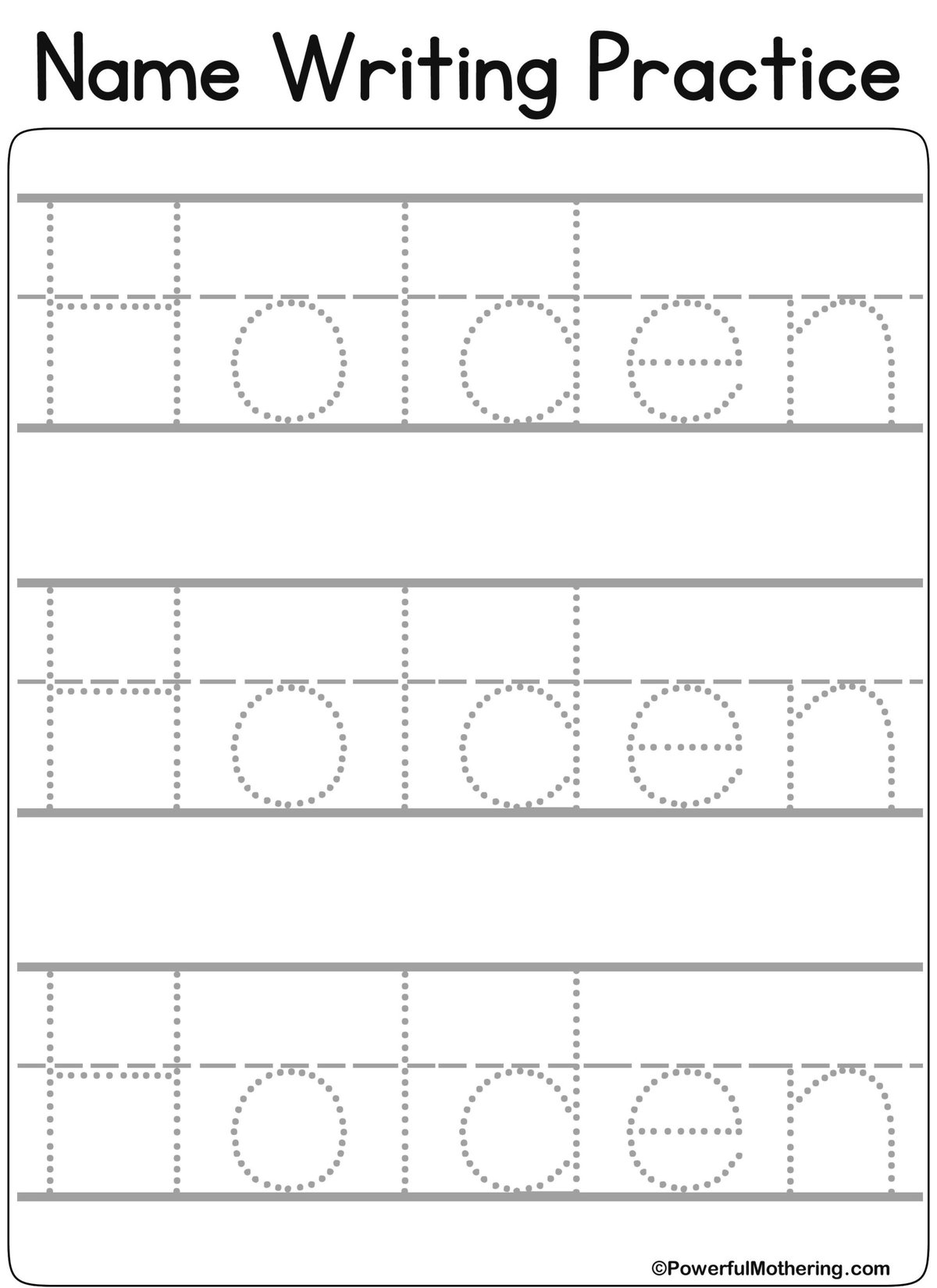
It’s a universally acknowledged truth that learning to write can be a messy, glorious, and often frustrating journey. Whether you’re a parent guiding a budding writer, an educator fostering early literacy, or even an adult looking to refine your own script, the quest for legible handwriting often starts with the basics: tracing. And in our digital age, name tracing generators have emerged as indispensable tools, offering personalized practice at your fingertips. But simply printing a worksheet isn't enough; the real magic happens when you know How to Use Name Tracing Generators Effectively for Better Handwriting.
This isn't just about repetition; it's about smart, targeted practice that builds confidence and skill. By understanding the nuances of these powerful tools, you can transform a simple tracing exercise into a dynamic learning experience, tailored perfectly to individual needs.
At a Glance: Harnessing Your Name Tracing Generator
- Personalize Everything: Go beyond just names to include sight words, vocabulary, or even short sentences.
- Choose the Right Style: Toggle between dotted, dashed, and solid letters to match the learner's developmental stage.
- Optimize Layouts: Utilize guiding lines, adjustable spacing, and different line formats for optimal support.
- Preview Before Printing: Always check your design in real-time to ensure clarity and proper formatting.
- Make it Engaging: Integrate tracing into fun, short sessions to prevent burnout and foster a positive attitude towards writing.
- It's 100% Free: Many top generators offer all features without cost or sign-up, making consistent practice accessible.
The Foundation: Why Early Handwriting Matters (and Where Tracing Fits In)
Before we dive into the "how-to," let's quickly underscore the "why." Handwriting isn't just about putting pen to paper; it's a fundamental cognitive exercise. It strengthens fine motor skills, improves hand-eye coordination, and even aids in reading comprehension and memory retention. For young children, mastering their name is often their first meaningful interaction with written language, a powerful step in developing self-identity and confidence.
Tracing acts as the bridge between pre-writing activities and independent writing. It allows learners to internalize letter shapes, strokes, and spacing without the added pressure of forming letters from scratch. This guided practice builds muscle memory and visual recognition, setting a solid foundation for fluent, legible handwriting.
Demystifying Name Tracing Generators: Your Personalized Tool
At its core, a name tracing generator is a digital tool that allows you to create custom worksheets for handwriting practice. Think of it as your personal, on-demand worksheet factory. Instead of buying generic workbooks or painstakingly drawing letters by hand, you can input any text—a child’s name, a list of sight words, or even a short sentence—and the generator instantly formats it into a traceable document.
These tools are designed with flexibility in mind, offering various options for letter styles, line guides, and layouts. The goal is to provide a perfectly customized learning aid that adapts to the specific needs and developmental stage of the learner. Many popular generators, like the one highlighted in our research, are completely free, web-based, and require no sign-ups, making them incredibly accessible for parents and educators alike.
Your Step-by-Step Guide to Crafting the Perfect Worksheet
Using a name tracing generator isn't complicated, but knowing how to leverage each feature effectively can make a world of difference. Here's how to create practice sheets that truly empower better handwriting:
1. Inputting Your Text: Beyond Just Names
The first step is always to input the text you want to be traced. While "name tracing generator" implies just names, don't limit yourself! This feature is incredibly versatile.
- Start with Names: Naturally, begin with the child’s first name, then add their last name. Seeing their own name in print makes the practice personal and meaningful.
- Expand to Sight Words: Once comfortable with their name, introduce high-frequency sight words (e.g., "the," "and," "is," "it"). This reinforces early reading skills simultaneously.
- Tackle Short Sentences: For slightly more advanced learners, try short, simple sentences (e.g., "I see the cat.") to practice spacing between words and sentence structure.
- Practice Specific Letters: If a child struggles with a particular letter, you can create a worksheet focusing solely on that letter, both uppercase and lowercase.
Pro Tip: For optimal learning, break down longer words or sentences into manageable chunks. A page with 3-5 different words or phrases is often more effective than one overwhelming block of text.
2. Choosing Your Tracing Style: Dotted, Dashed, or Solid?
This is where the magic of progressive learning comes in. Most generators offer multiple letter styles, each suited for different stages of skill development.
- Dotted Letters: Ideal for absolute beginners. These provide maximum guidance, showing the exact path of each stroke. The learner simply connects the dots, building confidence in letter formation.
- Dashed Letters (or Outline): A step up from dotted. These give a clearer visual of the letter shape but require slightly more precision to complete the lines. Great for transitioning from heavy guidance to more independent strokes.
- Solid Letters (or Faded/Grey): For learners who are almost ready to write independently. These letters offer a faint guide to trace over, reinforcing the shape while encouraging a smoother, more fluid motion. Some generators might offer solid letters as a "copy" example without tracing, which is also valuable.
Effective Use: Start with dotted letters. As the learner shows mastery, gradually move to dashed, and finally to solid/faded letters. This scaffolding approach ensures continuous progress without overwhelming them.
3. Customizing for Clarity: Font Size, Spacing, and Guiding Lines
The devil's in the details, and with name tracing generators, thoughtful customization can dramatically improve the learning experience.
- Font Size: For preschoolers and early kindergarteners, larger fonts are essential. They allow more room for error and better visual recognition of letter shapes. As fine motor skills improve, you can gradually reduce the font size.
- Letter and Word Spacing: Adequate spacing prevents letters from appearing cramped and helps children differentiate between individual letters and words. Adjust this to ensure clarity and comfort for the learner.
- Guiding Lines (Baselines and Midlines): This is perhaps one of the most crucial features for developing consistent letter size and alignment.
- Baseline: The solid line where letters "sit." Essential for grounding letters correctly.
- Midline (or Dotted Line): Helps guide the height of lowercase letters and the upper portion of uppercase letters (e.g., the top of 'a', 'c', 'e' aligns with the midline).
- Top Line: Guides the height of ascenders (e.g., 't', 'l', 'h') and uppercase letters.
Effective Use: Always use worksheets with guiding lines, especially baselines and midlines, for early learners. They provide crucial visual cues for correct letter formation and consistent sizing, which are hallmarks of legible handwriting.
4. The Power of Preview: See It Before You Print
One of the most valuable features of modern tracing generators is the live preview. As you make changes to font, style, or lines, the worksheet updates instantly on your screen.
Effective Use: Never skip the preview step. It allows you to:
- Catch any typos in your text.
- Ensure the letter style is appropriate.
- Verify that guiding lines are present and correctly aligned.
- Check for optimal spacing and font size.
This real-time feedback saves paper and ensures that every printed worksheet is perfectly suited for its purpose.
5. Printing & Saving: Your Worksheet, Ready to Go
Once you're happy with the preview, the final step is to print or save your worksheet.
- Print Directly: Most generators offer a direct print option. Ensure your printer settings are correct (e.g., landscape/portrait, scaling) for the best output.
- Download as PDF: This is often the preferred option. Saving as a PDF allows you to:
- Store worksheets for future use without having to recreate them.
- Easily share worksheets with other parents, teachers, or students.
- Print multiple copies whenever needed.
Effective Use: Create a dedicated folder on your computer for these personalized worksheets. You can organize them by child, by skill level, or by topic (names, sight words, sentences) for easy access.
Unlocking Advanced Features for Deeper Learning
Beyond the basic creation steps, many name tracing generators offer features that elevate simple practice to a more sophisticated learning experience.
Lined Worksheets: The Foundation of Good Form
While we touched on guiding lines earlier, generators often differentiate between just guiding lines under the text and a full "lined worksheet" format.
Effective Use: Opt for worksheets that incorporate full lines for each name or word. This not only provides a baseline for the tracing activity itself but also gives the learner a subsequent blank line (or multiple lines) to practice writing the word independently, reinforcing the learned muscle memory without a direct trace guide. This transition from tracing to independent writing on the same sheet is invaluable for consolidating skills.
Flexible Layouts: From Single Lines to Full Pages
Generators provide various layout options to suit different practice needs.
- One Name Per Line: Ideal for beginners, offering ample space and reducing visual clutter.
- Multiple Names/Words on Full Lines: As skills develop, use layouts that fit more text on a page, promoting stamina and sustained focus. This is great for practicing a list of sight words or a sequence of vocabulary.
Effective Use: Match the layout to the learner's attention span and current skill level. For short, focused practice, fewer, larger words are better. For reviewing multiple items, a denser layout can be efficient. Remember, you can always create a personalized learning plan that combines different worksheet types.
Personalization on the Fly: Custom Content for Every Need
The ability to type in any text, from a single name to a full sentence, is the generator's superpower. It means you're never limited to pre-made content.
Effective Use: Think creatively!
- Holiday-themed words: "Santa," "turkey," "ghost."
- Family members' names: "Mom," "Dad," "Grandma," and siblings' names.
- Favorite animals or objects: "Cat," "ball," "tree."
- Words related to current school lessons: Reinforce classroom learning at home.
This personalization makes learning relevant and exciting, keeping the child engaged and motivated.
Beyond the Name: Expanding Practice with Your Generator
Don't let the "name" in "name tracing generator" fool you. These tools are fantastic for a variety of handwriting and early literacy activities.
Sight Words and Early Vocabulary
Once a child has a grasp of letter formation, move on to sight words. These are words children are encouraged to recognize instantly without sounding them out, forming the backbone of early reading. Create worksheets for 5-10 sight words at a time. The tracing reinforces the visual memory of the word shape, aiding both reading and writing. This is a powerful way to teach sight words effectively.
Practicing Full Sentences
For children ready to compose short sentences, use the generator to create tracing sheets for them. This helps them practice:
- Proper spacing between words.
- Starting a sentence with a capital letter.
- Ending with appropriate punctuation.
- The flow of writing a complete thought.
Start with simple, predictable sentences and gradually increase complexity.
Reinforcing Letter Families and Phonics
If a child is learning about "at" words or "og" words, generate worksheets for "cat," "hat," "mat," or "dog," "fog," "log." This combines phonics practice with handwriting, creating a holistic learning experience. It's a key part of understanding phonics for kids.
Best Practices for Engaging Handwriting Sessions
Even the most perfectly generated worksheet won't be effective if the practice isn't engaging and consistent.
Keep it Short and Sweet
Children have limited attention spans. Aim for 5-10 minute practice sessions, a few times a day, rather than one long, tedious session. Short bursts are more effective for building skills and preventing burnout.
Make it Playful
Turn tracing into a game!
- Use colorful pens, pencils, or even thin markers.
- Trace in different colors for each letter.
- Let them decorate the worksheet after tracing.
- Incorporate tracing into a "secret message" activity.
Remember, the goal is to make writing feel like an enjoyable activity, not a chore.
Consistency is Key
Regular practice, even if brief, yields the best results. Try to establish a routine, perhaps a few minutes before breakfast or after school. The brain benefits from consistent reinforcement.
Celebrate Progress, Not Perfection
Focus on effort and improvement, not just flawless execution. Praise them for trying, for forming letters correctly, or for staying within the lines. A positive reinforcement environment is crucial for building confidence and a love for learning.
Incorporate Other Learning Tools
Tracing generators are a fantastic tool, but they shouldn't be the only tool. Supplement tracing with:
- Sensory bins: Tracing letters in sand, salt, or rice.
- Play-Doh: Forming letters with clay.
- Whiteboards: Practicing with dry-erase markers.
- Chalkboards: Large motor movements with chalk.
This multi-sensory approach reinforces learning through different modalities.
Common Questions About Name Tracing Generators
Are Name Tracing Generators Truly Free?
Yes! Most high-quality name tracing tools, like the one we've referenced, are completely free to use. You can create, customize, and print an unlimited number of worksheets without logging in, signing up, or paying a cent. This accessibility is a huge advantage for families and educators on a budget.
Can I Include Lines on My Tracing Worksheets?
Absolutely. This is a core feature of effective name tracing generators. You can choose to include clear baselines, midlines (often dashed), and top lines beneath each name or phrase. These lines are essential for guiding early learners as they develop accurate letter sizing and consistent handwriting.
What About Dotted, Dashed, and Solid Letter Formats?
Yes, these generators are designed with progressive learning in mind. You can typically toggle between dotted, dashed (or outline), and solid (or faded/grey) letter styles with a simple click. This allows you to start with maximum guidance (dotted) and gradually reduce support as the learner's skills progress towards independent writing.
Making the Most of Your Tracing Journey
Learning to write is a marathon, not a sprint. Name tracing generators are incredibly powerful allies in this journey, offering a level of personalization and flexibility that traditional workbooks can't match. By understanding how to use their features effectively – from choosing the right letter style and line guides to personalizing content and making practice fun – you're not just printing worksheets; you're crafting bespoke learning experiences.
Embrace these tools, integrate them thoughtfully into your learning routine, and watch as those wobbly lines transform into confident, legible strokes. Happy tracing!